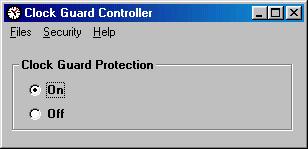
Clock Guard is a Windows software program that prevents tampering with the computer clock. It can be used for several purposes. A few examples are:
1) Preventing files from being given falsified time/date stamps by
manually resetting the system clock and then saving the file.
2) Prevent
employees who are using a computer-based time clock from altering the time to
allow themselves to "punch in" at a falsified time.
3) Prevent users who have
time limited programs (programs that can only be used at certain times) from
accessing these programs at improper times.
4) Prevent people who are paying
for computer use on a time basis from resetting the clock to reduce the amount
of time they pay for.
5) Prevent people who are restricted to a certain
amount of computer time per day (usually children) from resetting the computer
clock to give themselves more time.
Unlike other clock control programs, Clock Guard does not require an Internet connection. It does not automatically set the computer clock to the correct time by dialing up an atomic clock somewhere. It works by preventing sudden changes in the computer clock and/or by blocking access to programs that change the computer clock. You can deactivate clock protection with the password you select when you install it. This allows you to set the clock if it becomes wrong.
If you have any additional questions about this product, click here to send an email to Leithauser
Research
or call 386-410-6769.
Clock Guard is available as shareware ($20 individual fee. Volume discounts are available. For information on volume discounts, click here.). Try it for a month to see if you like it before you have to pay for it. Just download the install file to your computer, then run the file like a program by double-clicking on the install file in Windows Explorer or My Computer to install Clock Guard. Remember that complete instructions are provided for uninstalling Clock Guard if you decide that you do not like it.
Click here to download the installation program (cgarc.exe).
**** Awards ****








Click here to see a review of Clock Guard on 3d2f.com and click here to see another one. Click here to see a virus report.
**** Customization **** If you like this program, but would like to
see some improvements or additional features,
If you like this program, but would like to
see some improvements or additional features,
contact Leithauser Research at
[email protected] or (386)-410-6769 and
describe the addition features you would like to see in this program. If they
sound like good ideas, we will add the improvements at no charge.
Just part
of our customer service!
If you have any questions, please send email to [email protected]. In case of emergency, you can call (386) 410-6769 between the hours of 11 AM and 5 PM Eastern time.
If you prefer to write, the address is
Leithauser Research
821 SnapDragon Drive
New Smyrna Beach, FL
32168
Go to Leithauser Research home page
View Clock Guard Instruction Manual
.
.
.
.
.
.
.
.
This page has been viewed by
people since 4/9/2008
Visitors since Sept. 4, 2004
|
|
Powered by counter.bloke.com